VPS Oversold Detection Methods: Practical Guide to Steal Time and Disk Cache Cliff
Overselling is a common phenomenon in the VPS industry, but excessive overselling can significantly impact performance. This article provides actionable detection methods from the two dimensions of CPU Steal Time and Disk Cache Cliff to help you determine whether a VPS is overly oversold, and offers coping strategies.
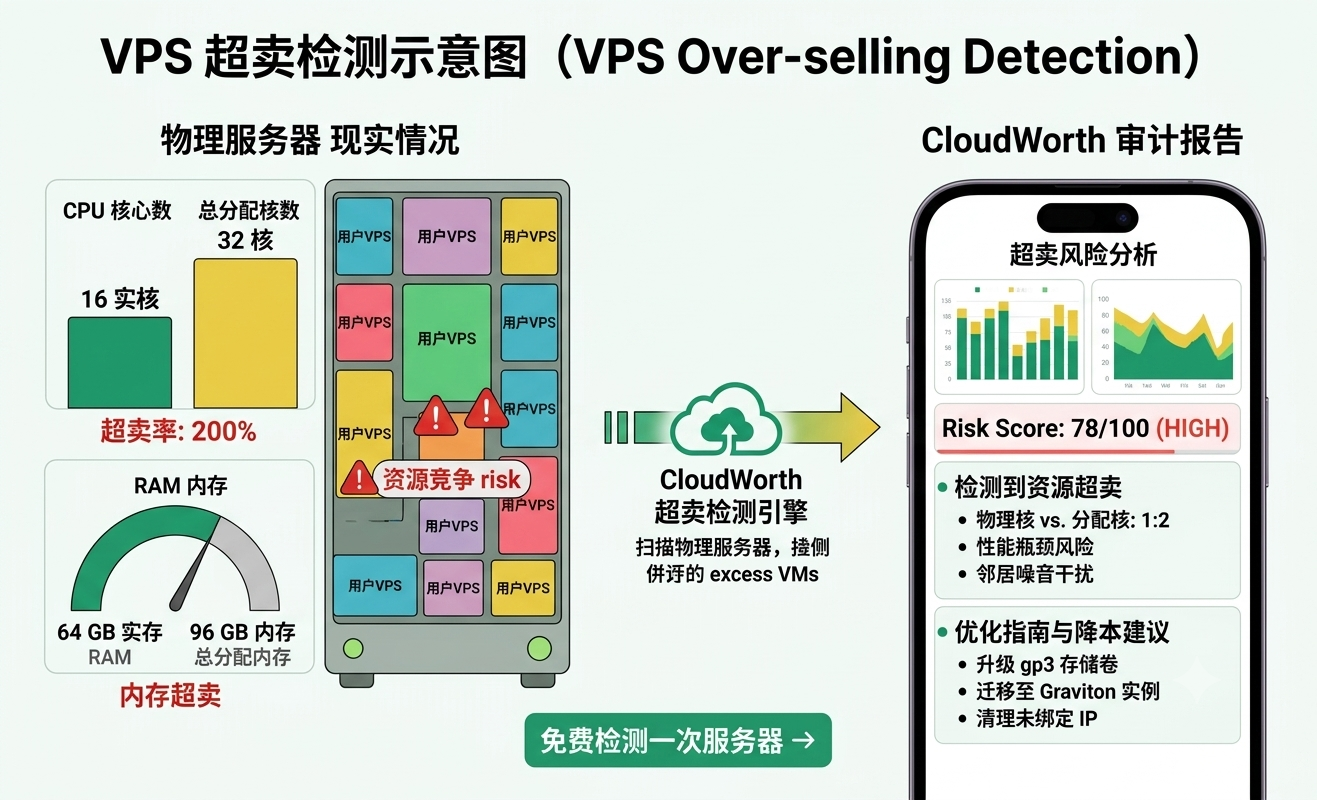
By continuously monitoring CPU Steal Time and Disk Cache Cliff phenomena, combined with stress testing, you can effectively identify overly oversold VPS, stop losses in time, and optimize deployment strategies.
Why do we need to detect VPS overselling?
VPS (Virtual Private Server) is derived from partitioning physical server resources based on virtualization technology. Overselling refers to the total virtual resources sold by providers exceeding the physical resource limit, which is a common practice in the IDC industry. Reasonable overselling can reduce costs, but excessive overselling can lead to CPU contention, disk I/O latency spikes, and even the so-called "noisy neighbor" problem.
As users, we cannot directly view the provider's overselling configuration, but we can indirectly judge it through the change patterns of system metrics. Among them, CPU Steal Time and disk Cache cliff are the two most direct and effective signals.
Core Metric 1: CPU Steal Time
What is Steal Time?
In Linux systems, the steal or st field represents the percentage of time the virtual machine's CPU is preempted by the hypervisor (host machine). When physical CPU resources are insufficient, the hypervisor forcibly schedules, causing your VPS to be unable to obtain the CPU time it deserves. This waiting time is Steal Time.
High Steal Time means your VPS is 'queuing for CPU' and performance is degraded.
How to View Steal Time?
Use the top command and check the st value in the %Cpu(s) line:
top -n 1 | grep '%Cpu'Example output:
%Cpu(s): 5.1 us, 2.0 sy, 0.0 ni, 92.0 id, 0.0 wa, 0.9 hi, 0.0 si, 0.0 stHere, st is the Steal Time. You can also use the vmstat command and pay attention to the st column (requires root privileges):
vmstat 1 5Judgment Thresholds
- Persistently above 5%: Indicates that the host CPU is overloaded, and your VPS begins to be affected.
- Peaks reaching 10% or more: May result in noticeable performance degradation, especially for tasks requiring sustained computation.
- Exceeding 20% over the long term: This is severe overselling; it is recommended to consider switching providers.
Stress Test Simulation
Simply looking at Steal Time when idle may not be obvious. It is recommended to use the stress tool to simulate CPU load and observe how Steal Time behaves under pressure:
# Install stress (Debian/Ubuntu)
apt install stress -y

# Load all CPU cores for 60 seconds
stress --cpu $(nproc) --timeout 60 &

# Also run top to observe
sleep 5 && top -d 2 | grep '%Cpu'
If the st value skyrockets under full load, it means that physical CPU resources are being heavily preempted by other VPS instances, indicating severe oversubscription.
Core Metric 2: Disk Cache Cliff
What is the Disk Cache Cliff?
The disk I/O performance of a VPS is highly dependent on the cache in the host machine's memory. When cache hits occur, read/write speeds are extremely fast; when cache misses occur (especially during sudden large bursts of read/write), the physical disk speed becomes the bottleneck, and performance drops by several orders of magnitude, forming a "cliff".
If too many VPS instances are running on the host, the cache ratio available to each VPS decreases, making it easier to trigger the cliff effect.
How to Detect Disk Cache Cliff?
Use hdparm or dd to test disk read/write speed and observe speed fluctuations.
1. Simple test:
# Write test (512MB file)
time dd if=/dev/zero of=testfile bs=1M count=512 conv=fdatasync

# Read test (after clearing cache)
echo 3 > /proc/sys/vm/drop_caches   # Requires root, clears page cache
time dd if=testfile of=/dev/null bs=1M count=512
Record the speed difference between the first and subsequent tests. If the first write speed is very fast (due to write cache) and then drops sharply, it indicates limited cache capacity and heavy contention.
2. Use fio for more precise testing:
# Install fio (Debian/Ubuntu)
apt install fio -y

# 4K random write test, 60 seconds
fio --name=randwrite --ioengine=libaio --rw=randwrite --bs=4k --size=1G --numjobs=4 --iodepth=16 --runtime=60 --time_based --direct=1 --group_reporting
Pay attention to the distribution of lat (usec) and iops. If the latency curve jitters sharply, it indicates that the physical disk performance is highly unstable when the cache misses.
How to Identify a Cliff
Perform multiple small-file read/write tests consecutively, recording the IOPS or throughput each time. For example:
for i in {1..10}; do
  dd if=/dev/zero of=testfile bs=1M count=64 oflag=direct 2>&1 | tail -1
  rm testfile
done
If the speed suddenly drops from hundreds of MB/s to tens of MB/s, and this occurs frequently, it can be identified as a disk cache cliff.
Other Auxiliary Detection Methods
1. Memory Availability
Overselling can also occur with memory. Use free -h to check available memory. If it often falls below 10% and swap usage is significant, it means memory is also oversold.
2. Neighbor Concurrency Test
Try running a stress test during specific time periods (e.g., evening peak hours) and compare the Steal Time with that of idle periods. If the metrics deteriorate significantly during peak hours, it provides further evidence of overselling.
3. Long-term Monitoring
It is recommended to use sar or atop to continuously record system metrics for at least one week. Pay attention to performance fluctuations at regular weekly times.
# Use sar to record CPU history (requires sysstat)
sar -u 60 > /tmp/cpu_history.log &
How to Deal with Overselling?
- Avoid peak hours: For non-real-time business, schedule tasks to off-peak periods.
- Add caching: Add caches like Redis at the application layer to reduce dependence on underlying disk I/O.
- Switch providers: If Steal Time remains high for a long time, decisively migrate to a cloud provider that does not oversell or has a low overselling ratio.
- Choose high-performance plans: Some providers offer VPS with "dedicated CPU" or "limited overselling", which costs more but has more stable performance.
We recommend using professional detection tools for assessment before purchase. You can get an automated detection script on the Detection Instructions Page to generate a detailed overselling detection report with one click.
Conclusion
VPS oversell detection is not a one-time operation, but requires continuous monitoring. Using the two key metrics—Steal Time and disk Cache cliff—combined with stress testing and long-term recording, you can effectively determine whether the current VPS is excessively oversold, and thus decide whether to upgrade or migrate.
Remember, no single metric can 100% confirm overselling, but combining data from multiple dimensions is enough to reveal the truth.
I hope this practical guide can help you avoid detours when choosing a VPS. If you are considering switching providers, it is recommended to first test your current server using the methods in this article, and then compare the test results with those of the target provider.